flowchart TD

    %% ======================
    %% USER
    %% ======================
    A[User Question]

    %% ======================
    %% LLM
    %% ======================
    subgraph LLMBOX["<B>LLM (Reasoning Engine)</B>"]
        L1[Understand Question]
        L2[Request Tools]
        L3[Interpret Query Results]
    end

    %% ======================
    %% SQL AGENT
    %% ======================
    subgraph AGENT["<B>SQL Agent Control</B>"]
        P[Agent Control Loop]
        G[Guardrails & Constraints]
    end

    %% ======================
    %% TOOLS
    %% ======================
    subgraph TOOLS["<B>Database Tools</B>"]
        T1[List Tables]
        T2[Describe Tables]
        T3[Sample Data]
        T4[Execute Read-Only SQL]
    end

    %% ======================
    %% DATABASE
    %% ======================
    subgraph DBLAYER[" <B>Protected Database</B>"]
        D[(PostgreSQL Database)]
    end

    %% ======================
    %% RESPONSE
    %% ======================
    R[<B>Final Answer to User</B>]

    %% ======================
    %% FLOW
    %% ======================
    A --> L1
    L1 --> L2
    L2 --> P

    %% Guarded execution
    P --> G
    G --> TOOLS

    TOOLS --> D
    D --> P

    %% Output control
    P --> L3
    L3 --> R

    %% ======================
    %% STYLES (LIGHT GRAY)
    %% ======================
    style LLMBOX fill:#f5f5f5,stroke:#d1d5db,stroke-width:2px
    style AGENT fill:#f5f5f5,stroke:#d1d5db,stroke-width:2px
    style TOOLS fill:#f5f5f5,stroke:#d1d5db,stroke-width:2px
    style DBLAYER fill:#f9fafb,stroke:#d1d5db,stroke-width:2px
    style A fill:#f9fafb,stroke:#d1d5db,stroke-width:2px
    style R fill:#f9fafb,stroke:#d1d5db,stroke-width:2px
1 Overview
Large Language Models (LLMs) are trained on vast amounts of public text such as websites, books, news articles, and online conversations. This gives them strong general language skills.
In real organizations, the most valuable knowledge lives in internal documents, databases, and systems that change over time. Because this information isn’t part of an LLM’s training data, standalone models quickly fall short. They may sound confident, but their answers are often incomplete, outdated, or simply wrong.
This shows up in practical ways:
- They can’t reliably answer questions over internal documents
- They struggle to query enterprise databases
- They tend to hallucinate when context is missing
- They don’t naturally respect security and access boundaries
Modern AI systems solve this not by training bigger models, but by connecting models to data carefully.
This project implements a hybrid knowledge access system that combines two proven patterns:
- Retrieval-Augmented Generation (RAG) for unstructured data like PDFs, reports, and internal documentation
- A tool-driven SQL agent for structured data stored in PostgreSQL databases
Instead of treating the LLM as a source of truth, the system uses it as a reasoning layer. The model retrieves evidence from private sources, reasons over it, and produces answers that are grounded in real data.
At a high level:
- A user asks a natural-language question
- The system determines whether the answer requires documents, databases, or both
- Relevant information is retrieved from internal sources
- The LLM generates a response based only on that retrieved context
The goal of this project is not just to build a working RAG pipeline, but to engineer a reliable, modular, and production-ready hybrid architecture that makes LLMs useful inside real systems.
2 Problem Definition
Organizations don’t store knowledge in one place. It’s spread across:
- Unstructured documents such as PDFs, manuals, and internal policies
- Structured databases containing operational and analytical data
LLMs provide a powerful natural-language interface, but on their own they cannot safely operate over private or evolving data. Without external grounding, models hallucinate, return stale information, and offer answers that can’t be verified.
The real challenge is not generation, but controlled access to knowledge.
A practical system must:
- Ground every answer in retrieved evidence
- Work across both documents and databases
- Enforce read-only access and security constraints
- Scale to large data volumes
- Keep latency and cost predictable
- Support debugging and evaluation
This project addresses those requirements by combining:
- A RAG pipeline for document retrieval and context construction
- A tool-mediated SQL agent that safely translates questions into validated, read-only queries
The result is a hybrid architecture with RAG and SQL Agent where the LLM reasons, tools retrieve, and data remains protected, producing answers that are explainable, auditable, and grounded.
3 RAG Stream: From Raw Documents to Grounded Answers
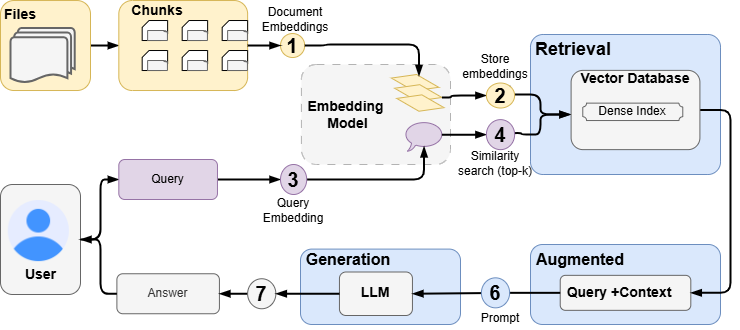
This section walks through the Retrieval-Augmented Generation (RAG) stream of the project, explaining how raw documents are transformed into reliable, context-aware answers.
The goal of this stream is to allow an LLM to answer questions using private documents without hallucinating or guessing.
3.1 Document Ingestion & Parsing
The pipeline begins with raw documents parsing, where documents are converted into clean, structured text before any downstream processing is possible. This project uses llama-parse to convert a wide range of document formats into structured markdown, preserving headings and layout information.
3.1.1 Core Features & Parsing Fundamentals
LlamaParse is a GenAI-native document parser designed for converting complex documents into LLM-ready data for Retrieval-Augmented Generation (RAG) systems and it excels at:
- Complex Document Handling: Financial reports, research papers, scanned PDFs
- Precise Extraction: Tables, charts, images, and diagrams
- LLM-Ready Output: Clean markdown, text, or structured JSON
3.1.1.1 Supported File Formats (70+)
| Category | Formats |
|---|---|
| Documents | PDF, DOC, DOCX, RTF, TXT, EPUB |
| Spreadsheets | XLSX, XLS, CSV, ODS |
| Presentations | PPTX, PPT |
| Images | JPG, PNG, GIF, BMP, TIFF, WEBP, SVG |
| Web | HTML, HTM |
| Audio | MP3, MP4, WAV, WEBM, M4A (≤20MB) |
3.1.1.2 Pricing
- Free Tier: 1,000 pages daily
- Paid Tier: 7,000 pages/week + $0.003/additional page
3.1.1.3 API Key Setup
LlamaParse requires an API key from LlamaCloud.
Steps to get your API key:
- Go to https://cloud.llamaindex.ai/
- Sign up or log in
- Navigate to API Keys section
- Create a new API key (starts with
llx-)
3.1.1.4 Architecture
- LlamaParse provides both synchronous and asynchronous methods:
| Sync Method | Async Method | Description |
|---|---|---|
load_data() |
aload_data() |
Parse and return Documents |
parse() |
aparse() |
Parse and return JobResult |
get_images() |
aget_images() |
Get extracted images |
- LlamaParse uses a job-based architecture:
Document → Submit Job → Poll Status → Get ResultsKey Components:
LlamaParse Client: Main interface for document parsing
Job: Represents a parsing task (can be async)
JobResult: Contains parsed content, pages, images, charts, layout
Document: LlamaIndex Document object with text and metadata
Available pre-optimized configurations (presets) for different document types
| Preset | Best For | Description |
|---|---|---|
fast |
Quick extraction | No OCR, fastest processing |
balanced |
General documents | Balance of speed and accuracy |
premium |
Complex documents | Best quality, uses advanced models |
structured |
Forms, tables | Optimized for structured data |
auto |
Mixed content | Automatic mode selection |
scientific |
Research papers | LaTeX, equations, citations |
invoice |
Invoices, receipts | Financial document extraction |
slides |
Presentations | PowerPoint, slide content |
3.1.1.5 Parse Modes
1. High-Level Modes (Boolean flags):
fast_mode: Skip OCR, fastest processingpremium_mode: Best available parserauto_mode: Automatic mode selection2. Granular Parse Modes (Page-level):
parse_page_without_llm: Fast extraction without AIparse_page_with_llm: Uses LLM for each pageparse_page_with_lvm: Uses vision model for pagesparse_page_with_agent: Agentic reasoning per pageparse_page_with_layout_agent: Layout-aware agent
3.2 Chunking the Document
Large documents are split into smaller, semantically meaningful chunks. This is essential because:
- Embedding models have input limits
- Smaller chunks improve retrieval accuracy
This project uses Chonkie’s RecursiveChunker, which is character-based, LLM-agnostic and production-safe. Chunks are created with:
- A fixed size (2048 characters)
- Minimum length enforcement
- Stable character offsets for traceability
3.2.1 Why this choice
Chonkie is a production-ready text chunking library designed specifically for RAG applications. It provides:
- 9 specialized chunkers (RecursiveChunker, TokenChunker, SentenceChunker, TableChunker, CodeChunker, SemanticChunker, LateChunker, NeuralChunker, SlumberChunker)
- Local processing - your data never leaves your infrastructure
- High performance - optimized for speed and efficiency
- Thread-safe - suitable for concurrent processing
- Flexible embeddings - works with OpenAI, Gemini, Sentence Transformers, and more
3.3 Embedding Generation
In this project, each chunk is converted into a numerical vector (embedding) using Sentence Transformers (local) to capture each chunk’s semantic meaning (other alternatives include OpenAI, Gemini). The same process is later applied to user queries. 768-dimensional embeddings are generated locally and cached to avoid recomputation.
3.3.1 Why this choice
- No external API dependency
- Predictable cost (zero per-request fees)
- Easy to swap models
- Suitable for private environments
3.4 Vector Storage & Retrieval
All chunk embeddings are stored in a vector database. At query time, the system retrieves the most relevant chunks using similarity search (Top-K document chunks are ranked by semantic similarity). This project uses Qdrant as the vector store, with the following key features:
- Cosine similarity
- Metadata filtering (namespace, filename)
- Payload indexing
- Async client for scalability
3.4.1 Why this choice
- Easy to self-host (Open-source) and cloud hosted (with 1GB free cluster).
- Strong filtering and indexing support
- Clean Python API
3.5 Context Construction
Retrieved chunks are formatted into a single context block, preserving:
- Source filename
- Relevance score
- Optional heading hierarchy
This context becomes the grounding evidence for the LLM and is used to generate the final answer.
3.5.1 Why this matters
- Improves answer quality
- Enables traceability
- Reduces hallucination risk
3.6 Augmented Prompt Generation
The user’s question and the retrieved context are combined into a single prompt. The prompt explicitly instructs the LLM to use only the provided context and admit when information is missing. A grounded, constrained prompt is then sent to the LLM.
3.7 Answer Generation
The LLM generates the final answer using the augmented prompt. This implementation uses Groq LLM APIs for fast inference, but the architecture is model-agnostic. A clear, grounded answer with optional source citations is returned to the user.
3.8 Artifact & Cache Storage
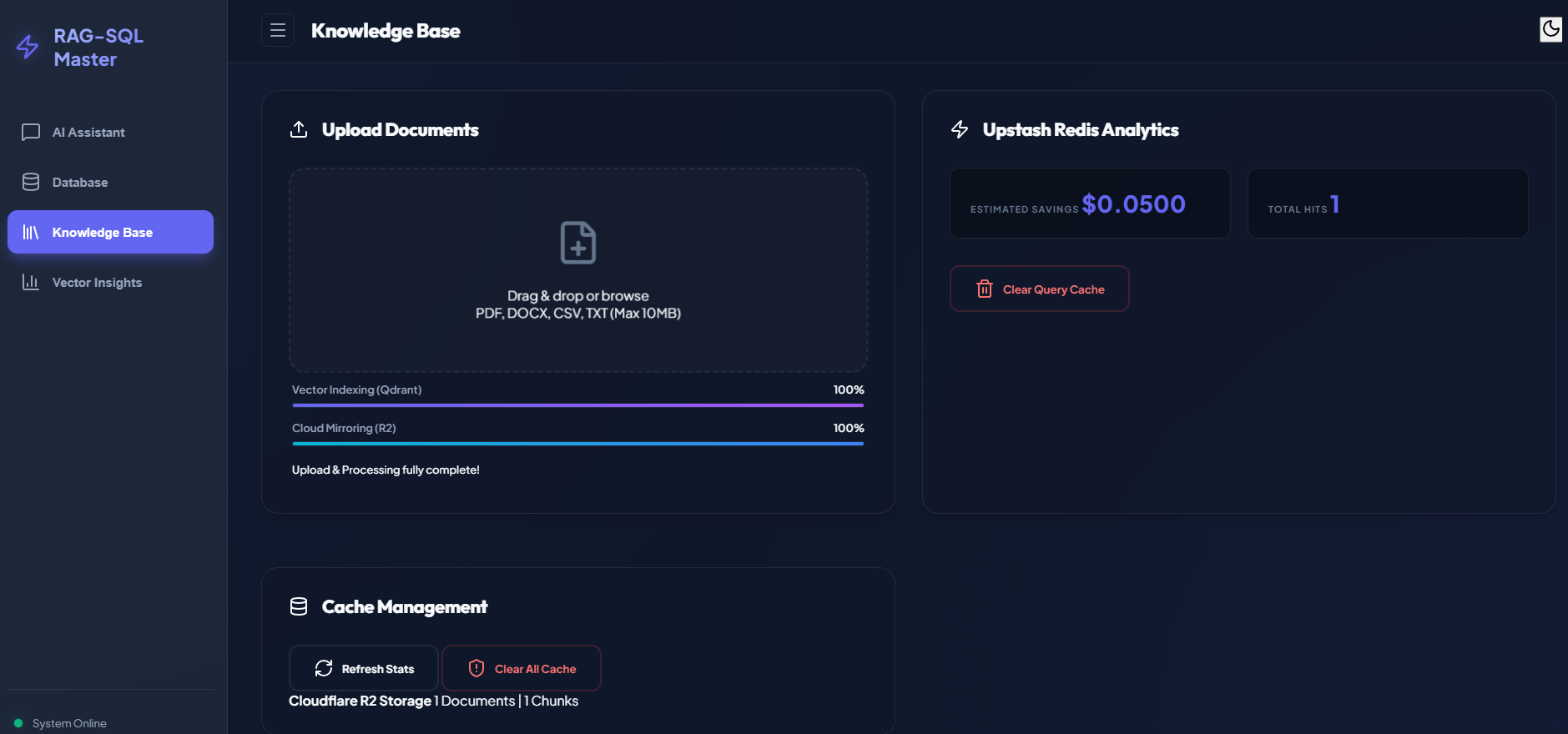
To improve performance and reproducibility, intermediate artifacts are stored in Cloudflare R2 which is a low-cost object storage service and is S3-compatible. The following artifacts are stored:
- Original documents
- Chunks
- Embeddings
- Metadata
3.8.1 Why this matters
- Faster reloads
- Stateless services
- Easy reindexing
- Lower compute cost (with 10 GB free storage)
3.9 Summary
This RAG stream turns raw, private documents into grounded, auditable answers by combining:
- Robust document parsing
- Deterministic chunking
- Local embedding generation
- Vector-based retrieval
- Context-aware LLM prompting
Most importantly, the LLM is never treated as a source of truth. It is a reasoning layer operating strictly on retrieved evidence.
4 SQL Agent Stream: Safe Natural Language Access to Databases
While the RAG stream handles unstructured knowledge like documents and manuals, many real-world questions require direct access to structured data stored in relational databases. This stream focuses on enabling safe, reliable, and auditable database querying using natural language, without giving the LLM unrestricted access to the database.
4.1 User Question
A user submits a natural language question that requires database access. At this point, the system does not assume the question is valid or executable.
4.2 LLM as a Reasoning Engine
The LLM receives the user question along with a strict system prompt that defines its role. In this project, the LLM is not a data source and not allowed to answer directly.
Its responsibilities are limited to:
- Understanding the user’s intent
- Planning how to explore the database
- Deciding which tools to call and in what order
- Explaining its reasoning for every tool call
This separation ensures that:
- The LLM cannot hallucinate results
- All answers must be grounded in actual database queries
- Every step is explainable and auditable
4.3 Agent Control Loop
The SQL Agent runs inside a controlled reasoning loop, where each iteration performs the following steps:
- The LLM proposes tool calls
- Tools are executed by the system (not the LLM)
- Tool outputs are fed back to the LLM
- The loop continues until a final answer is produced
This loop is bounded by a maximum number of iterations and hard failure conditions. This design prevents:
- Infinite reasoning loops
- Unbounded database exploration
- Uncontrolled compute costs
4.4 Guardrails & Constraints
Before any SQL is executed, the system enforces hard safety rules that the LLM cannot override.
These include:
Read-only enforcement
- No INSERT, UPDATE, DELETE, DROP, ALTER, or CREATE
Mandatory LIMIT clause
- Prevents large result sets
Schema validation
- Only known tables and columns are allowed
Tool usage enforcement
- The LLM must call at least one database tool
Temporal query guards
- Prevents ambiguous “current” or “latest” queries without validation
If any rule is violated, execution stops immediately.
4.5 Database Tools
The LLM can request a limited set of explicit tools, each designed for a specific purpose:
List Tables
- Discover available tables
Describe Tables
- Inspect schema and columns
Sample Data
- Preview small subsets of rows
Execute Read-Only SQL
- Run validated, constrained queries
Each tool:
- Requires a reasoning parameter
- Runs inside controlled Python code
- Uses a secure PostgreSQL connection
4.5.1 Why this matters
Tools act as the only gateway to the database.
The LLM never touches SQL execution directly.
4.6 Protected Database Access
All database operations go through a protected PostgreSQL connection with:
- Read-only enforcement
- Cursor-level control
- Automatic rollback on failure
- Limited result sizes
The database is treated as a protected system, not an LLM playground.
4.7 Interpreting Query Results
Tool results are returned to the LLM as structured messages then the LLM:
- Interpret the data
- Summarize insights
- Translate technical results into business-friendly language
Crucially, the LLM does not fabricate numbers and if no relevant data is found, it must say so explicitly.
4.8 Final Answer to the User
Once the LLM has:
- Used at least one database tool
- Passed all guardrails
- Interpreted real query results
It produces a final answer that:
- Is grounded in actual data
- Is formatted in clear Markdown
- Avoids exposing raw SQL unless requested
- Is understandable to non-technical users
This SQL Agent stream complements the RAG stream by enabling safe, explainable access to structured data, while preserving all the reliability guarantees required for real-world systems. Together, the RAG stream and SQL Agent stream form a unified knowledge access layer where:
- Documents are retrieved, not guessed
- Databases are queried, not hallucinated
- LLMs reason, but never act unchecked
5 Unified Hybrid Flow: RAG + SQL Agent
Modern organizations store knowledge in multiple forms. Some of it lives in documents like reports, manuals, and policies. Some of it lives in databases like transaction tables, analytics schemas, and operational systems. Treating these two worlds separately limits what users can ask.
This project implements a unified hybrid flow that allows a single natural-language question to be answered using:
- Retrieval-Augmented Generation (RAG) for unstructured documents
- A tool-driven SQL Agent for structured relational data
- Or both together, when the question requires combined reasoning
The system is designed so the LLM acts as a reasoning layer, while all data access is explicit, controlled, and auditable.
flowchart TD

    %% ======================
    %% USER
    %% ======================
    subgraph USER["<B>User</B>"]
        A[User Asks a Question]
    end

    %% ======================
    %% API GATEWAY
    %% ======================
    subgraph API["<B>API Gateway</B>"]
        B[API Receives the Question]
    end

    %% ======================
    %% ROUTING SERVICE
    %% ======================
    subgraph ROUTING["<B>Routing Service</B>"]
        C[Decides the Best Path]
    end

    %% ======================
    %% EXECUTION PATHS
    %% ======================
    subgraph EXEC["<B>Execution Paths</B>"]
        D[Query Business Database]
        E[Search Knowledge Base]
        F[Combine Sources if Needed]
    end

    %% ======================
    %% DATA & KNOWLEDGE
    %% ======================
    subgraph DATA["<B>Data & Knowledge</B>"]
        G[(Business Database)]
        H[(Knowledge Base)]
        K[(Knowledge + Database)]
    end

    %% ======================
    %% RESPONSE
    %% ======================
    subgraph RESPONSE["Response"]
        I[Generate Clear Answer]
        J[Return Answer to User]
    end

    %% ======================
    %% FLOW
    %% ======================
    A --> B
    B --> C

    C -->|Data Question| D
    C -->|Knowledge Question| E
    C -->|Mixed Question| F

    D --> G
    E --> H
    F --> K

    G --> I
    H --> I
    K --> I

    I --> J

    %% ======================
    %% STYLES (LIGHT GRAY)
    %% ======================
    style USER fill:#f9fafb,stroke:#d1d5db,stroke-width:2px
    style API fill:#f9fafb,stroke:#d1d5db,stroke-width:2px
    style ROUTING fill:#f5f5f5,stroke:#d1d5db,stroke-width:2px
    style EXEC fill:#f5f5f5,stroke:#d1d5db,stroke-width:2px
    style DATA fill:#f9fafb,stroke:#d1d5db,stroke-width:2px
    style RESPONSE fill:#f9fafb,stroke:#d1d5db,stroke-width:2px
5.1 User Asks a Question
The flow begins when a user submits a natural-language question. At this point, the system does not assume where the answer should come from.
5.2 API Gateway Receives the Request
The API Gateway serves as the single entry point for all queries. Its responsibilities include:
- Accept the user question
- Attach session and request metadata
- Forward the question to the routing service
No reasoning or data access happens here.
5.3 Routing Service Decides the Best Path
The Routing Service analyzes the question and determines which execution path is required:
Data Question → Requires structured database access → Route to the SQL Agent
Knowledge Question → Requires document understanding → Route to the RAG pipeline
Mixed Question → Requires both documents and database facts → Route to the hybrid execution path
5.4 Execution Paths
5.4.1 SQL Agent Path (Structured Data)
For data-driven questions:
The SQL Agent uses the LLM as a reasoning engine
The LLM plans database exploration steps
Database tools are executed under strict guardrails:
- Read-only queries
- Schema validation
- Automatic limits
- Mandatory tool usage
The database remains fully protected
The LLM never executes SQL directly, it only reasons about which tool should run next.
5.4.2 RAG Path (Unstructured Knowledge)
For document-driven questions:
- Relevant documents are parsed and chunked
- Embeddings are generated using a local embedding model
- Similar chunks are retrieved from the vector database
- Retrieved context is combined with the user question
- The LLM generates an answer grounded strictly in retrieved content
This ensures answers are evidence-based, not hallucinated.
5.4.3 Hybrid Path (Knowledge + Database)
For mixed questions:
The system retrieves relevant document context and
Executes validated SQL queries via the SQL Agent
Both sources are combined into a single augmented context
The LLM generates a unified answer that:
- Explains what the documents say
- References what the data shows
This allows true cross-source reasoning without compromising safety.
5.5 Data & Knowledge Layer
All execution paths ultimately draw from the same Data & Knowledge layer, which includes:
- Business Database (PostgreSQL)
- Knowledge Base (vector store)
- Combined Knowledge + Database context (for hybrid queries)
This layer is treated as the source of truth, never the LLM.
5.6 Generate a Clear Answer
Once relevant data is retrieved:
- The LLM interprets results
- Converts technical outputs into human-readable explanations
- Avoids fabricating missing information
- Explicitly states when data is insufficient
The answer is formatted for clarity and trust, not verbosity.
5.7 Return Answer to User
The final response is returned to the user with:
- Clear reasoning
- Grounded evidence
- No hidden assumptions
- No hallucinated facts
From the user’s perspective, this feels like a single intelligent assistant but internally, it is a carefully orchestrated system.
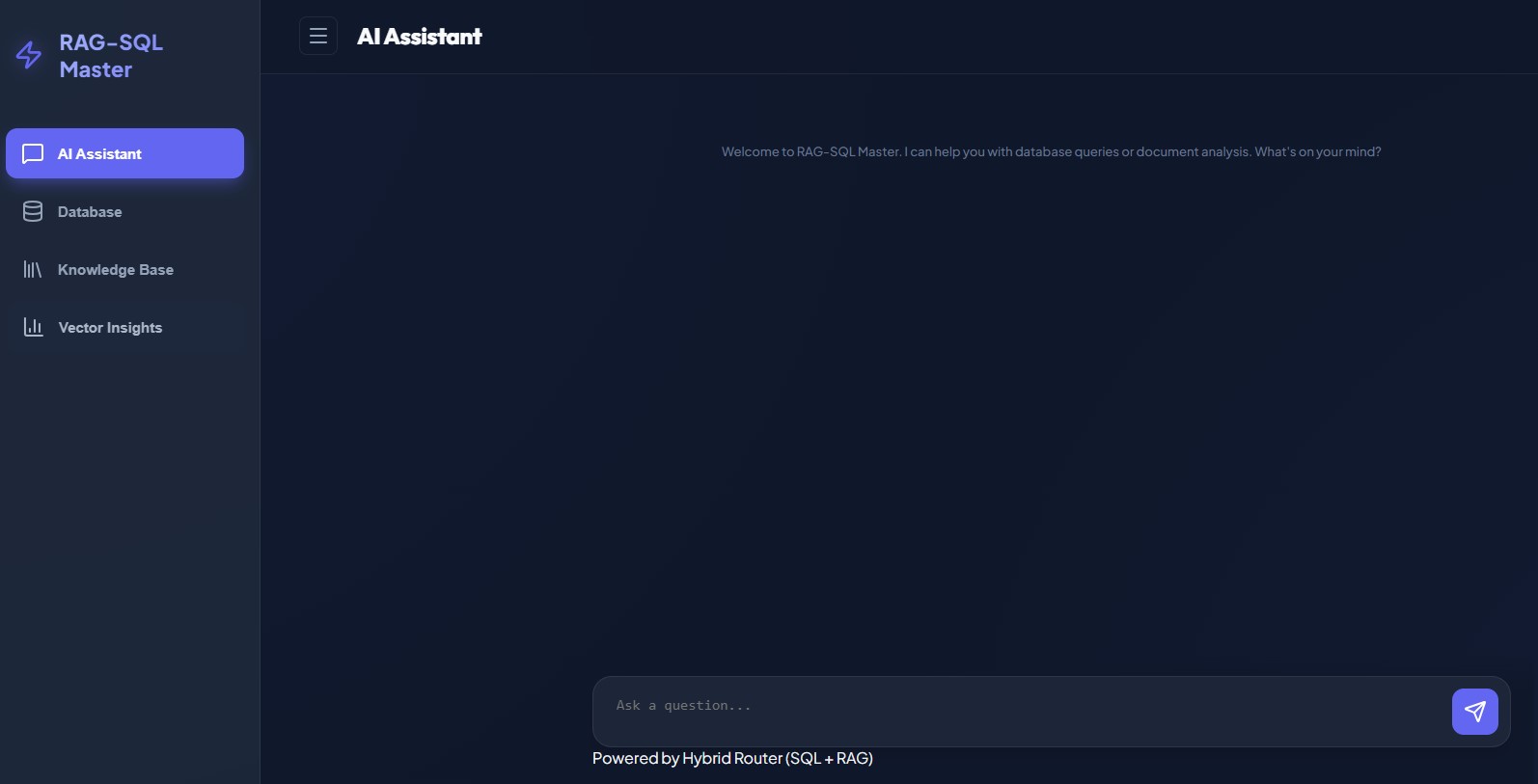
6 System Overview
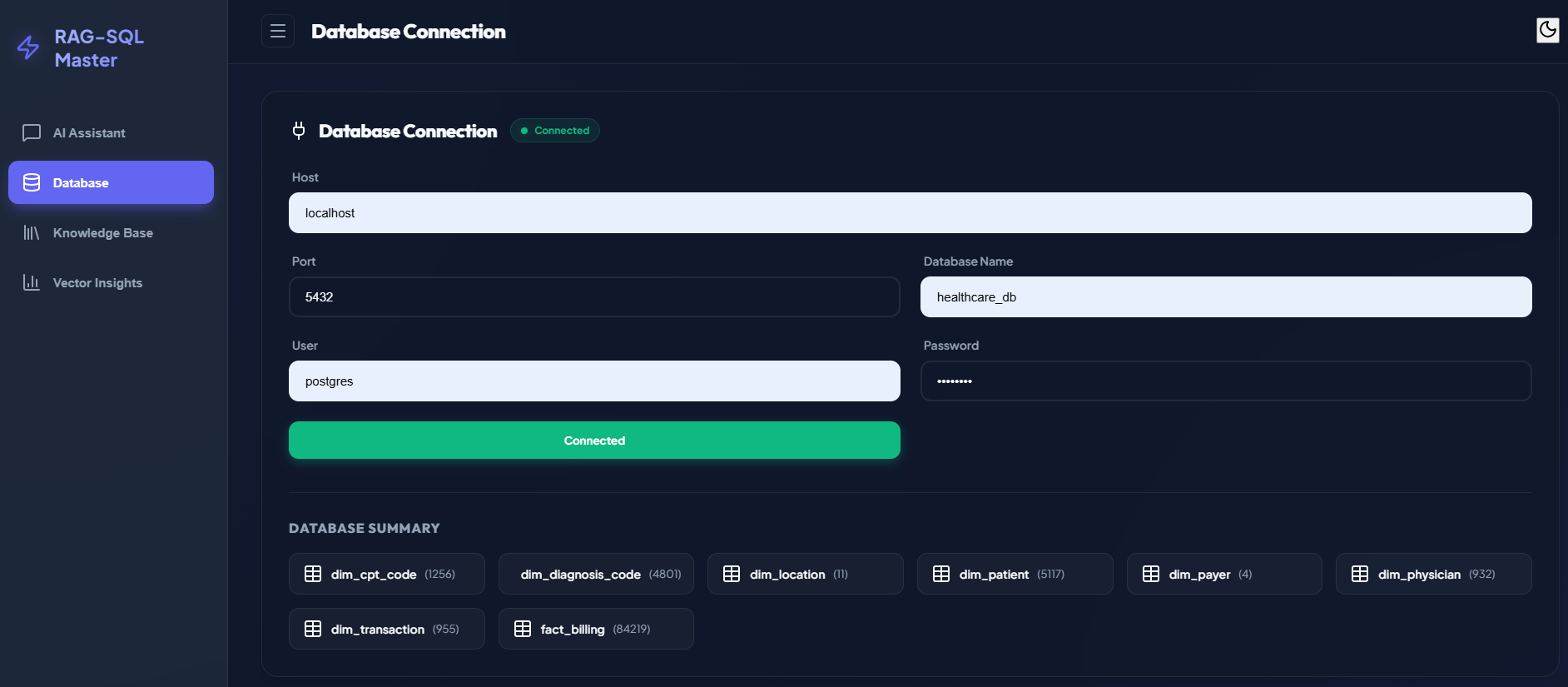
6.1 Database Connection view
6.2 Document Retrieval view
6.3 Vector Search view
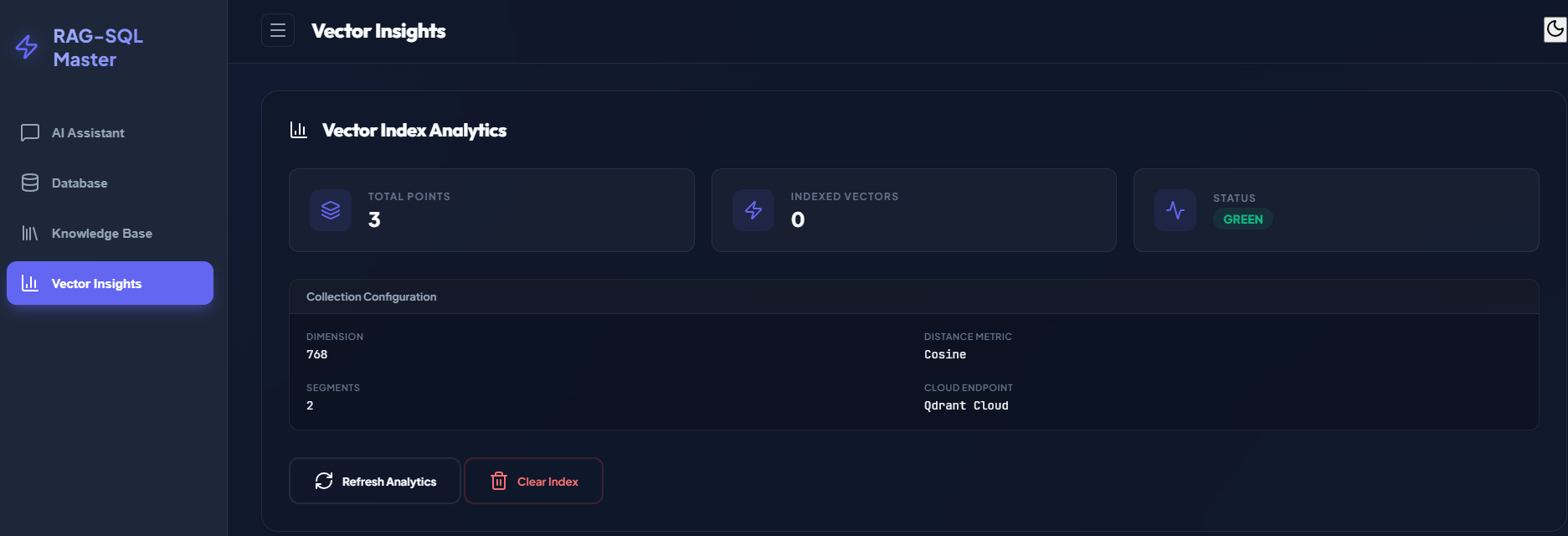
Contact me to request access to the live demo.
7 Skills & Concepts Demonstrated
- End-to-end RAG pipeline implementation
- SQL agent with tool-based database access
- LLM prompt engineering for grounding and reasoning
- Vector database integration for retrieval
- Document parsing and chunking for unstructured data
- API design for hybrid knowledge access
- Production-ready architecture for reliability and safety